Download your YouTube Music history
In Google Takeout, select YouTube and YouTube Music, keep history, and choose JSON. Download the ZIP to get watch-history.json.
Before you start
Use the Google account you listen with. A computer makes the ZIP easier to inspect. Takeout can only export activity Google still holds, so paused or deleted history will be missing.
Where to check your watch history
In YouTube Music, open your profile picture, then Settings, Privacy & location, Manage watch history. YouTube and YouTube Music share this setting. Plays made while history was paused, or removed by auto-delete, will not be in the file. YouTube Music Help.
Export in five steps
Open Google Takeout, select Deselect all, then tick YouTube and YouTube Music.
Keep this export focused on listening history. Uploaded videos can make the archive much larger.
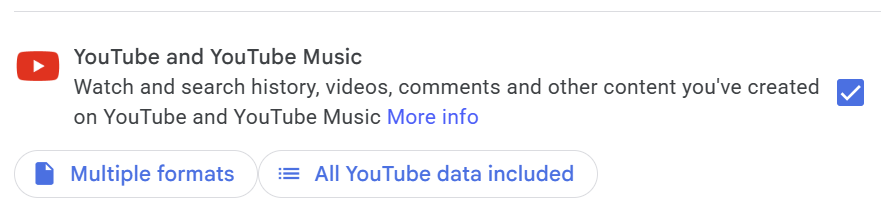
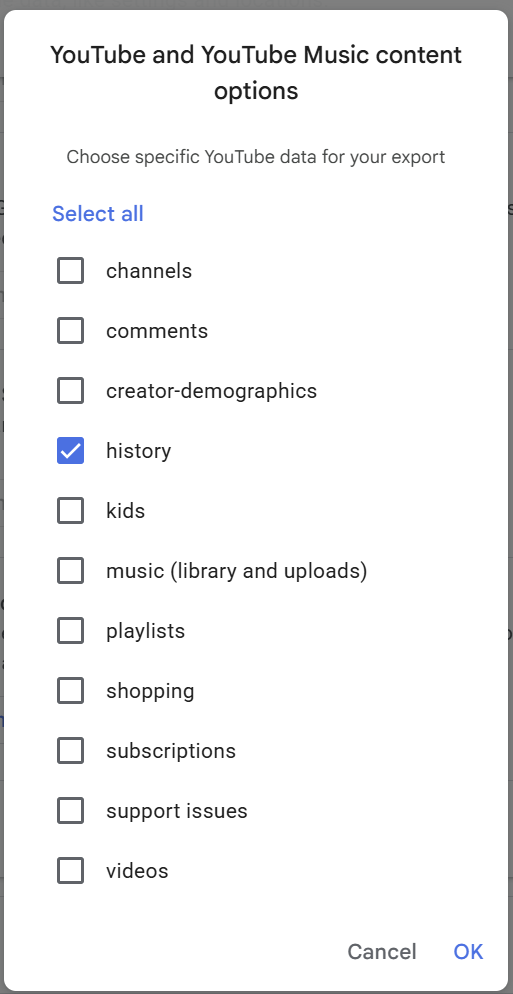
Open All YouTube data included. Deselect the other categories, leave history selected, and confirm.
The history selection is separate from playlists and uploaded music.
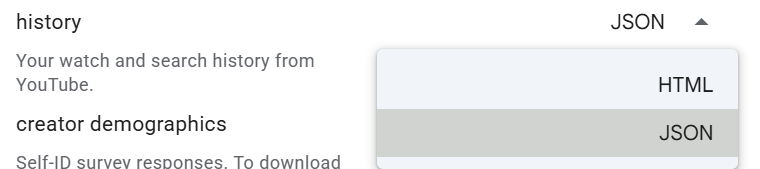
Open Multiple formats. Set History to JSON and confirm.
JSON is the format stats tools commonly import. An HTML export is designed for browsing.
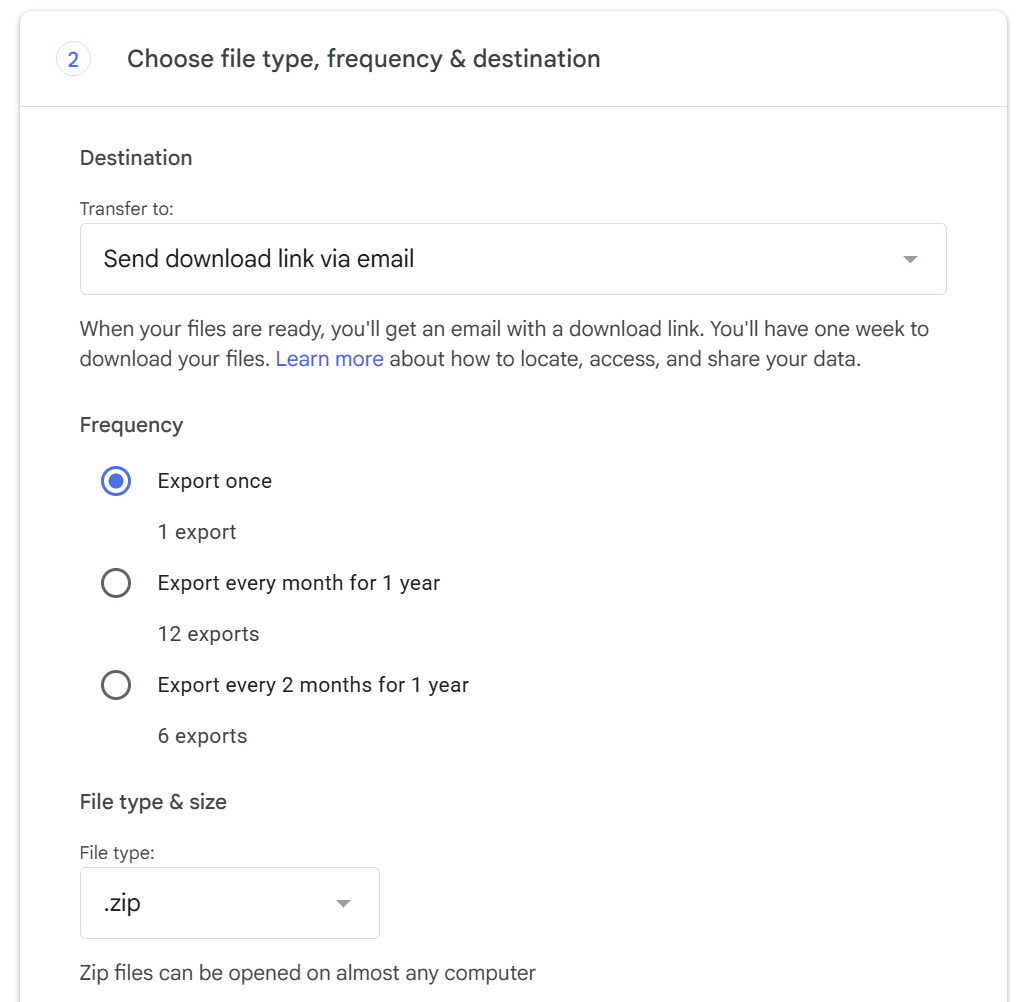
Select Next step, then use these settings:
- Delivery: download link by email
- Frequency: export once
- File type: .zip
Select Create export. Google will email you when it is ready; preparation can take minutes to days.
Download the archive from Google’s email, unzip it, and follow this path.
Save the original ZIP as well. The download link expires after about seven days, but the copy on your device stays available.
Takeout/
  YouTube and YouTube Music/
    history/
      watch-history.json
Other delivery options and download limits
You can send the archive to Google Drive, Dropbox, Microsoft OneDrive or Box instead of email. Google says download links expire in about seven days, and each archive can be downloaded five times.
Google documents delivery, frequency, file type and expiry on its Takeout help page. Button labels can change. The YouTube-specific labels here follow the linked walkthroughs in Sources.
Use your history
You do not need to read the JSON yourself. Choose a tool that accepts Google Takeout, then follow its import instructions.
- For a free browser view: try Playback Stats or YT Music Stats.
- For a profile and recaps on iPhone or Android: import into Listenality. Connect YouTube Music separately for your liked songs and playlists. See what Listenality reads.
- For another app option: Shuffl publishes its own Takeout import guide.
The file records when a play started, not how long you listened. Any listening-time total calculated from song lengths is an estimate.
What the JSON fields mean
Inside watch-history.json
| Field | What it holds | Why it matters |
|---|---|---|
| header | "YouTube Music" or "YouTube" | Lets a tool keep music plays and drop ordinary videos |
| title | The activity label, usually including the song or video title | The song name |
| titleUrl | A link to the song or video, when Google has one | Identifies the exact track |
| subtitles | The channel, usually the artist | The artist name |
| time | When the play started (ISO 8601) | Dates each activity entry retained in the export |
Field meanings follow the Playback Stats format guide. One file holds both YouTube and YouTube Music, which is why the header field matters.
The honest limit: the file records when a play started, not how long it lasted. Minutes listened can only be estimated from song lengths. Anything deleted from your history is gone from the export too.
Keep it current
A Takeout file is a snapshot. Export again for newer plays. Listenality on iPhone uses a fresh Takeout file for each new YouTube Music monthly recap. On Android, enabled play tracking can record new plays after setup; Takeout adds the older history.
One-time and scheduled exports
A Takeout file is a snapshot. To see new plays, export again. Google's help page describes a scheduled export every 2 months for one year. When we checked the live Takeout page on 2026-09-23, it also offered a monthly schedule. Listenality makes a monthly recap from a fresh Takeout each month, so choose monthly if you see it, or request a one-off export in the months between. The history-only export above is small, so it is usually quick.
Troubleshooting
I cannot find a history folder
Go back to step 2 and include history in the export.
My file is HTML instead of JSON
Repeat the export with History set to JSON in step 3.
The download link has expired
Create a new export. Google keeps download links for about seven days.
Some of my listening is missing
Check that you exported the account you listen with. Paused, deleted or auto-deleted activity will not be in the file.
About this guide and its screenshots
We make Listenality. The steps also work with the other tools named here. Screenshots are published references from Browser History Reader; their original capture dates are not stated. Google may show different button labels in your account.
Questions
Does Google Takeout include YouTube Music history?
Yes. It sits in the same watch-history file as your YouTube history, under YouTube and YouTube Music, and each YouTube Music play is labeled with the header "YouTube Music".
How long does a YouTube Music Takeout take?
Google says preparing an export can take from a few minutes to a few days. Wait for the download notification rather than assuming it will arrive the same day.
Should I choose JSON or HTML?
Choose JSON if you plan to use a stats tool or app. HTML is readable in a browser but most tools cannot import it.
How far back does the history go?
As far back as your watch history was on and not deleted. Periods when history was paused, or activity removed by auto-delete, are not in the file.
Can I set Takeout to export my history automatically?
Yes. Choose a scheduled export. Google's help page describes every 2 months for one year, and the live page offered monthly when we checked on 2026-09-23. For anything more frequent, request a one-off export by hand.
Listenality supports Apple Music and YouTube Music on iPhone, and YouTube Music on Android.
Get ListenalitySources and checked dates
- How to download your Google data, Google Account Help (checked )
- View, delete, or pause watch history, YouTube Music Help (checked )
- Decode My Feed, How to export your YouTube watch history (checked )
- Shuffl, How to export your YouTube Music listening history (checked )
- Playback Stats, watch-history.json format and fields (checked )
- Playback Stats, home page (checked )
- YT Music Stats, home page (checked )
- Shuffl, home page and pricing (checked )
- Browser History Reader, published Takeout screenshots (capture date not stated) (checked )